SnappyHexMesh Tutorial: Patient-Specific Aorta Meshing
Overview
This comprehensive tutorial covers advanced techniques for creating high-quality computational meshes for patient-specific aorta geometries using OpenFOAM's snappyHexMesh utility. Learn the complete workflow from STL preparation to simulation-ready mesh generation with physiologically accurate boundary conditions.
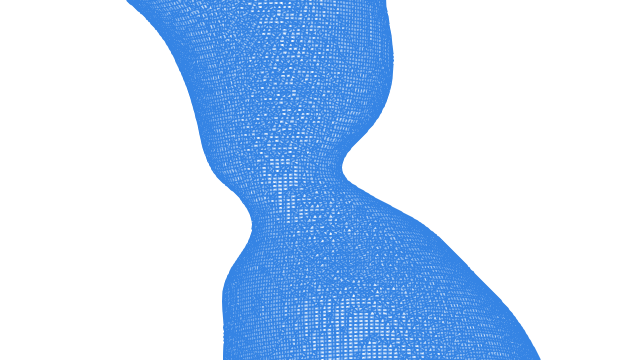 Patient-specific aorta mesh generated with snappyHexMesh, showing refined boundary layers and branch resolution.
Prerequisites
Required Knowledge & Tools
- OpenFOAM: Version 12 (Foundation) installed and configured
- Basic CFD Understanding: Familiarity with mesh generation concepts
- Linux/Unix: Command line proficiency
- Geometry Files: Patient-specific STL files prepared
Understanding Aorta Geometry
The aorta presents unique meshing challenges that require specialized techniques:
Key Geometric Challenges
- 🫀 Complex Bifurcations: Aortic arch branches require careful feature edge detection and local refinement
- 📏 Variable Diameter: From ascending (≈30mm) to small branches (≈5mm) - automatic refinement essential
- 🌊 Curved Geometry: Sharp curvatures need proper cell aspect ratios and orthogonality
- 🌳 Branch Vessels: Small outlets require adequate cross-sectional resolution (>10 cells)
Required Input Files
case/constant/triSurface/
├── wall_aorta.stl      # Main vessel wall
├── inlet.stl           # Inlet boundary
├── outlet_desc.stl     # Descending aorta outlet
├── outlet_bca.stl      # Brachiocephalic outlet
├── outlet_lcca.stl     # Left common carotid
└── outlet_lsca.stl     # Left subclavian
Background Mesh Setup
The background mesh defines your computational domain and must encompass the entire aorta geometry with appropriate margins.
blockMeshDict Configuration
FoamFile
{
    version     2.0;
    format      ascii;
    class       dictionary;
    object      blockMeshDict;
}

convertToMeters 1;

vertices
(
    (-0.1 -0.1 -0.1)    // Minimum bounding box
    ( 0.1 -0.1 -0.1)
    ( 0.1  0.1 -0.1)
    (-0.1  0.1 -0.1)
    (-0.1 -0.1  0.3)    // Maximum bounding box
    ( 0.1 -0.1  0.3)
    ( 0.1  0.1  0.3)
    (-0.1  0.1  0.3)
);

blocks
(
    hex (0 1 2 3 4 5 6 7) (40 40 80) simpleGrading (1 1 1)
);
Domain Sizing Guidelines
- Margins: 5-10 vessel diameters from geometry surface
- Aspect Ratio: Keep background cells roughly cubic
- Resolution: Start with 1-2mm cell size for typical aorta
Feature Edge Detection
Feature edges are critical for capturing vessel bifurcations and ensuring proper mesh topology at complex junctions.
Extract Features
This creates .eMesh files containing feature edge information.
snappyHexMeshDict Configuration
castellatedMeshControls
{
    features
    (
        {
            file "wall_aorta.eMesh";
            level 2;        // Refinement at feature edges
        }
    );

    resolveFeatureAngle 30;     // Detect features > 30°
    planarAngle 30;             // Planar surface angle
}
Why Feature Detection Matters
- Bifurcation Capture: Ensures branch junctions are properly resolved
- Geometry Fidelity: Maintains sharp edges and transitions
- Mesh Quality: Prevents poor cells at geometric features
- Flow Physics: Accurate representation affects hemodynamics
Common Issue
If resolveFeatureAngle is too small (< 20°), you may get excessive refinement and poor mesh quality.
Geometric Alignment: Critical for Mesh Quality
Proper geometric alignment with the coordinate system is crucial for snappyHexMesh quality. Research from PhD studies demonstrates that misaligned geometries lead to significantly degraded mesh quality and numerical instability.
Impact of Geometric Misalignment
A systematic study using U-bend geometries with progressive 45-degree rotations (XY, XZ, YZ planes) demonstrated that misalignment with the background mesh coordinate system degrades mesh quality significantly:
| Configuration | Max Non-Orthogonality | Max Skewness | Boundary Layer Coverage |
|---|---|---|---|
| Aligned (original) | ~45 deg | ~1.5 | >95% |
| XY rotation (45 deg) | ~55 deg | ~2.5 | ~85% |
| XY+XZ rotation | ~65 deg | ~3.5 | ~75% |
| XY+XZ+YZ rotation | ~70 deg | ~4.0 | ~65% |
These results indicate that misaligned geometries produce higher skewness and non-orthogonality, distorted boundary layers, and degraded near-wall cell quality that directly affects hemodynamic predictions such as wall shear stress Jasak 1996.
Automated Alignment in AortaCFD
PCA-Based Alignment in AortaCFD
AortaCFD automatically aligns patient geometries using Principal Component Analysis (PCA). The algorithm extracts surface vertices from the combined STL patches, computes the three principal axes via eigendecomposition of the covariance matrix, and applies a rotation matrix to align the geometry's longest axis with the Z-coordinate. This is implemented in src/aortacfd_lib/aorticAxisEstimator.py.
Alignment Best Practices
Manual Alignment Guidelines
If not using automated tools:
- Orient longest axis along Z-coordinate (flow direction)
- Center geometry at coordinate origin
- Minimize rotations from principal axes
- Check bounding box alignment with coordinate planes
- Verify inlet/outlet normal vectors align with coordinate axes
Quality Metrics Improvement
Proper alignment typically improves: - Non-orthogonality: 30-50% reduction in maximum values - Skewness: 40-60% improvement in boundary cells - Boundary layers: More uniform thickness distribution - Convergence: Faster solver convergence and stability
Surface Refinement Strategy
Different regions of the aorta require different mesh densities based on flow physics and geometric complexity.
refinementSurfaces Configuration
refinementSurfaces
{
    wall_aorta
    {
        level (1 2);        // Base refinement: 1-2 levels

        regions
        {
            // Localized refinement for critical areas
            arch
            {
                level (2 3);    // Higher at aortic arch
            }
            branches
            {
                level (3 4);    // Highest at bifurcations
            }
            stenosis
            {
                level (4 5);    // Maximum for pathology
            }
        }
    }

    inlet
    {
        level (2 3);           // High refinement for inlet profile
        patchInfo
        {
            type patch;
        }
    }

    "outlet.*"
    {
        level (2 3);           // Adequate outlet resolution
        patchInfo
        {
            type patch;
        }
    }
}
Automatic Refinement Levels
AortaCFD Automatic Calculation
AortaCFD automatically calculates optimal refinement levels based on minimum vessel diameter:
| Quality Level | Cells per Diameter | Cell Size | Use Case |
|---|---|---|---|
| Coarse | 10-12 cells/D | 200k-500k cells | Geometry checks, initial exploration |
| Standard | 15-20 cells/D | 500k-2M cells | Production simulations (recommended) |
| Fine | 25-30 cells/D | 2M-5M cells | Mesh independence studies |
Resolution is controlled by the cells_per_diameter parameter in config.json. Cell counts vary with anatomy.
Global Refinement Strategy
Based on PhD research, AortaCFD employs a global refinement approach that provides several advantages over local refinement strategies:
Global vs. Local Refinement
Global Refinement Benefits: - Uniformly high resolution throughout the domain - Simplified user experience - no complex region definitions - LES compatibility - consistent resolution for turbulence modeling - Flexible resource scaling - easy adjustment for computational constraints
Why Global Refinement was Chosen: - Early development tested "searchableBox" local refinement - Added complexity with limited flexibility across patient geometries - Global approach achieves sufficient control while maintaining simplicity - Better suited for automated workflows and batch processing
Research-Validated Quality Targets
Based on extensive cardiovascular CFD research, the following quality thresholds are recommended:
Mesh Quality Targets for Cardiovascular CFD
| Metric | Target Range | Clinical Impact |
|---|---|---|
| Non-orthogonality | < 60° (max 70°) | Affects pressure gradient accuracy |
| Skewness | < 1.5 internal, < 4 boundary | Critical for wall shear stress |
| Cell volume ratio | > 0.01 | Prevents convergence issues |
| Aspect ratio | < 100 near walls | Important for boundary layer resolution |
| Y+ values | < 1 (wall-resolved) | Required for accurate WSS calculation |
Span-Based Refinement
For stenotic or coarctation cases, span-based refinement ensures adequate cross-sectional resolution.
Configuration for Stenosis
refinementRegions
{
    wall_aorta
    {
        mode            insideSpan;
        level           (1000 3);       // Distance and refinement level
        cellsAcrossSpan 30;             // Minimum cells across diameter
    }

    // Alternative: distance-based refinement
    stenosis_region
    {
        mode            inside;
        level           4;

        // Define region geometry
        cylinder
        {
            point1 (0.02 0.01 0.15);    // Start point
            point2 (0.02 0.01 0.20);    // End point
            radius 0.015;                // Refinement radius
        }
    }
}
Stenosis Refinement Guidelines
| Severity | Diameter Reduction | Cells Across | Reasoning |
|---|---|---|---|
| Mild | < 30% | 20 cells | Capture basic flow disturbance |
| Moderate | 30-50% | 30 cells | Resolve recirculation zones |
| Severe | > 50% | 40 cells | Capture jet formation/breakdown |
Boundary Layer Generation
Accurate wall shear stress calculation requires proper near-wall mesh resolution through prismatic boundary layers.
addLayersControls Configuration
addLayersControls
{
    relativeSizes       true;           // Use relative sizing

    layers
    {
        wall_aorta
        {
            nSurfaceLayers 5;           // 5 prismatic layers
        }
    }

    expansionRatio      1.2;            // Layer growth ratio
    finalLayerThickness 0.3;            // 30% of surface cell size
    minThickness        0.1;            // Minimum absolute thickness

    // Quality controls
    featureAngle        60;             // Layer collision angle
    slipFeatureAngle    30;             // Allow slip at features
    nRelaxIter          5;              // Relaxation iterations
    nSmoothSurfaceNormals 1;            // Surface normal smoothing
    nSmoothNormals      1;              // Volume normal smoothing
    nSmoothThickness    10;             // Thickness field smoothing

    // Advanced controls
    maxFaceThicknessRatio 0.5;          // Face thickness ratio
    maxThicknessToMedialRatio 0.3;      // Medial axis ratio
    minMedianAxisAngle  90;             // Medial axis angle
    nBufferCellsNoExtrude 0;            // Buffer zone
    nLayerIter          50;             // Maximum iterations
}
Y+ Targeting
Y+ Requirements for Cardiovascular Flows
- y+ < 1: Wall-resolved simulation (DNS/LES)
- y+ = 30-300: Wall function approach (RANS)
- Avoid: 5 < y+ < 30 (buffer region)
Where \(u_\tau\) is friction velocity, \(y\) is wall distance, \(\nu\) is kinematic viscosity.
Layer Thickness Calculation
For y+ ≈ 1 in aortic flow:
# Estimate first layer thickness
Re = 4000          # Typical aortic Reynolds number
D = 0.025          # Vessel diameter (m)
nu = 1.5e-6        # Blood kinematic viscosity at 37°C

# Wall shear stress estimation
tau_w = 0.5 * rho * U^2 * f/8  # Empirical correlation
u_tau = sqrt(tau_w / rho)      # Friction velocity

# First layer thickness for y+ = 1
delta_1 = nu / u_tau  # ≈ 20-50 μm
Common Layer Issues
- Collision at bifurcations: Reduce
finalLayerThicknessorfeatureAngle - Poor coverage: Increase
nRelaxIterand smoothing parameters - Excessive skewness: Check surface mesh quality first
Mesh Quality Controls
Robust quality controls ensure numerical stability and accuracy of CFD simulations.
meshQualityControls Configuration
meshQualityControls
{
    // Primary quality metrics
    maxNonOrtho         65;         // Non-orthogonality limit
    maxBoundarySkewness 20;         // Boundary skewness
    maxInternalSkewness 4;          // Internal skewness
    maxConcave          80;         // Concavity angle

    // Volume and area constraints
    minVol              1e-13;      // Minimum cell volume
    minTetQuality       1e-30;      // Tetrahedral quality
    minArea             -1;         // Minimum face area (disabled)
    minTwist            0.02;       // Face twist factor
    minDeterminant      0.001;      // Mesh determinant
    minFaceWeight       0.05;       // Face interpolation weight
    minVolRatio         0.01;       // Adjacent cell volume ratio

    // Smoothing and error reduction
    nSmoothScale        4;          // Smoothing iterations
    errorReduction      0.75;       // Error reduction factor

    // Relaxed quality during mesh generation
    relaxed
    {
        maxNonOrtho     75;
        maxBoundarySkewness 25;
        maxInternalSkewness 8;
    }
}
Quality Verification
# Comprehensive mesh check
checkMesh -allGeometry -allTopology

# Key metrics to verify:
# ✓ Non-orthogonality < 70°
# ✓ Skewness < 4
# ✓ Aspect ratio < 100
# ✓ All cells positive volume
Expected Quality Ranges
| Metric | Excellent | Good | Acceptable | Poor |
|---|---|---|---|---|
| Non-orthogonality | < 45° | < 65° | < 75° | > 75° |
| Skewness | < 1 | < 2 | < 4 | > 4 |
| Aspect Ratio | < 10 | < 50 | < 100 | > 100 |
Running snappyHexMesh
Execute the mesh generation process with proper monitoring and parallel efficiency.
Sequential Execution
# Step 1: Create background mesh
blockMesh

# Step 2: Extract feature edges
surfaceFeatureExtract

# Step 3: Run snappyHexMesh
snappyHexMesh -overwrite

# Step 4: Check mesh quality
checkMesh -allGeometry -allTopology
Parallel Execution
# Decompose domain for parallel processing
decomposePar -noZero -force

# Run snappyHexMesh in parallel
mpirun -np 8 snappyHexMesh -parallel -overwrite

# Reconstruct the mesh
reconstructParMesh -constant -latestTime

# Clean up processor directories
rm -rf processor*

# Final quality check
checkMesh -allGeometry -allTopology
AortaCFD Automated Parallel Processing
AortaCFD implements intelligent parallel processing based on research optimisation:
# Research-based parallel automation from PhD thesis
def run_parallel_meshing(n_processors, case_dir):
    """
    Automated parallel snappyHexMesh execution with optimization
    """
    if parallel_meshing_enabled:
        # Decompose for parallel processing
        os.system("decomposePar -noZero -force")

        # Execute snappyHexMesh in parallel
        cmd = f"mpirun -np {n_processors} snappyHexMesh -parallel -overwrite"
        os.system(cmd)

        # Reconstruct mesh
        os.system("reconstructParMesh -constant -latestTime")

        # Clean up processor directories
        os.system("rm -rf processor*")
    else:
        # Sequential execution for small cases
        os.system("snappyHexMesh -overwrite")
Performance Optimization
Resource Requirements
Recommended Core Counts:
- Small mesh (< 2M cells): 4-8 cores
- Medium mesh (2-8M cells): 8-16 cores
- Large mesh (> 8M cells): 16-32 cores
Memory Requirements: - Estimate 1-2 GB RAM per million cells - Add extra for feature extraction and layer addition
Expected Mesh Statistics
| Quality | Cell Count | Generation Time | Memory Usage |
|---|---|---|---|
| Coarse | 1-2M | 10-30 min | 4-8 GB |
| Medium | 3-5M | 30-90 min | 8-16 GB |
| Fine | 8-12M | 2-4 hours | 16-32 GB |
Next Step: Boundary Conditions
Once your mesh is generated and validated, the next critical step is setting up physiologically accurate boundary conditions.
Boundary Conditions Tutorial
📖 Boundary Conditions for Cardiovascular CFD
This comprehensive tutorial covers:
- Inlet conditions: Pulsatile flow profiles and patient-specific data
- Outlet modeling: 3-element Windkessel and advanced pressure models
- Wall boundaries: Rigid and moving wall implementations
- Physiological parameters: Age-adjusted values and validation targets
- Integration: Complete case setup and solver compatibility
Validation and Results
Mesh Validation
# Final comprehensive check
checkMesh -allGeometry -allTopology -constant

# Mesh statistics
foamLog log.snappyHexMesh

# ParaView visualization
paraFoam
Key Validation Points
- ✅ All quality metrics pass
- ✅ Boundary layer coverage > 90%
- ✅ Feature edges properly captured
- ✅ No negative volume cells
- ✅ Smooth refinement transitions
Expected Flow Physics
The mesh should resolve:
- Dean vortices in curved sections
- Recirculation zones at bifurcations
- Wall shear stress gradients
- Pressure drop across stenosis
- Transitional flow features
Quality Indicators
- y+ values in target range
- Convergent residuals (< 1e-6)
- Reasonable pressure gradients
- Physiological wall shear stress (0.5-2.5 Pa)
Integration with AortaCFD
Automated Mesh Generation in AortaCFD
The entire process is automated in the AortaCFD pipeline:
# Complete mesh generation
python run_patient.py BPM120 --steps case,mesh

# With specific resolution
python run_patient.py BPM120 --steps case,mesh --config config_mesh_fine.json
Automated features include PCA-based geometry alignment, global refinement controlled by cells_per_diameter, parallel snappyHexMesh execution, mesh quality assessment with adaptive numerics via the regenerate-numerics step, and quality reporting.
Automation Workflow
The AortaCFD pipeline automates each stage of mesh generation based on validated research methodologies:
| Step | Manual Process | AortaCFD Automation |
|---|---|---|
| Geometry Prep | Manual alignment, unit conversion | PCA alignment, auto-scaling from STL |
| Mesh Setup | Complex snappyHexMeshDict editing | Template-based generation from cells_per_diameter |
| Quality Control | Manual checkMesh interpretation | Automated quality assessment and adaptive numerics |
| Parallel Execution | Manual decomposition/reconstruction | Configured via run_settings.subdomains |
| Validation | Manual mesh inspection | Automated quality reporting to reports/ |
Quick Reference
Key Takeaways
- Feature edges are essential for bifurcation capture
- Span refinement ensures adequate cross-sectional resolution
- Boundary layers are critical for wall shear stress accuracy
- Quality control prevents numerical instabilities
- Physiological BCs are required for meaningful results
References
Full bibliography on the References page.
Next Steps
- Windkessel Tutorial - 3-Element RCR boundary conditions
- GitHub Repository - Complete automated workflow
- OpenFOAM Documentation - Official OpenFOAM guides
Found an issue or have a suggestion for this page?
Open a GitHub issue